Konfigure — better app configuration using Kotlin

If you work on an application which uses Firebase Remote Config or something similar, you’ve probably wanted to test remote changes and run in to some trouble. Making sure config changes work before shipping them to the public can be painful without complex bespoke solutions. We wanted to make it easier for both our developers and our testers, so we developed Konfigure.
What is Konfigure?
Konfigure makes the use of tools like Firebase Remote Config easy by simplifying what it takes to wire up properties to actual remote values, saving you time and making things tidier. It’s built for extension, and can do a lot out of the box. Let’s explore some of the things that Konfigure is.
Konfigure is a Firebase Remote Config Wrapper
var isSomethingEnabled: Boolean by config()
That magic one-liner corresponds to a key (isSomethingEnabled) in Firebase Remote config. We can immediately start using it in code, and when we change the value of that key in Firebase, our code now uses it!
if (config.isSomethingEnabled) {
    TODO("Enable something")
}
Konfigure is a debugging tool
Say you wanted to toggle the value of the isSomethingEnabled key without changing it in Firebase. We can override it by setting the value of that property.
// Debugging my feature toggle
config.isSomethingEnabled = true
That’s handy! But, what if you didn’t want to make a code change to toggle that value? Easy. Just install the konfigure-android module, implement ConfigProvider in your Application class and launch the ConfigActivity. You’ll be greeted with a UI, which you can make more descriptive by adding metadata to your property.
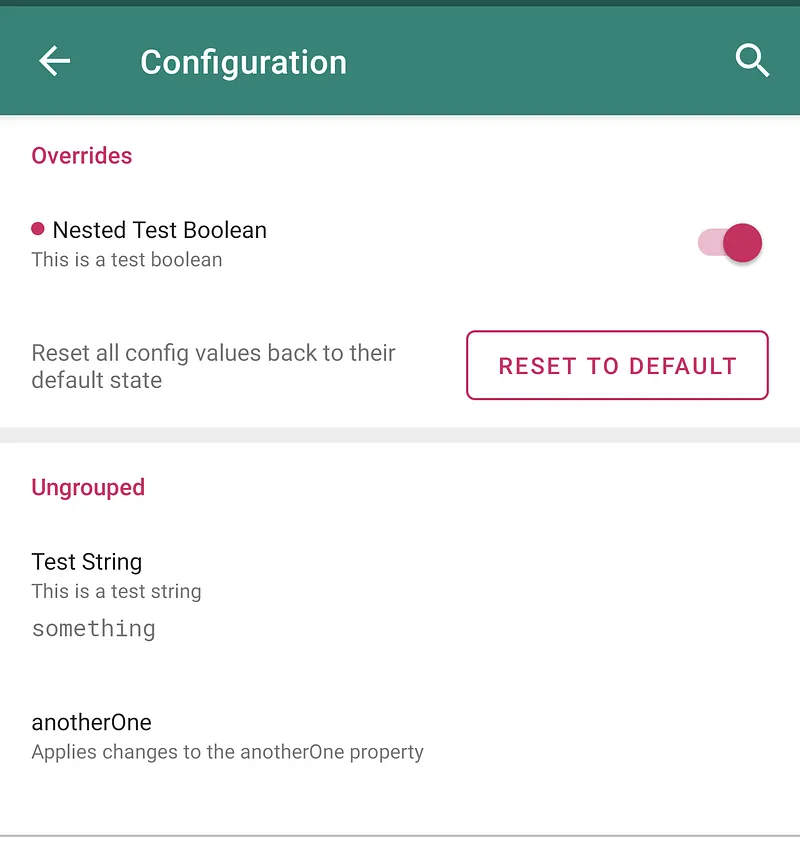
Examples of Boolean and String properties, using metadata for title and description
You’ve overridden something, nice! But, how do you persist that change across app restarts? Easy. Just use the provided SharedPreferencesOverrideHandler for persisting your changes to disk.
class AppConfig(context: Context): Config(
    configSources = listOf(FirebaseRemoteConfigSource()),
    overrideHandler = SharedPreferencesOverrideHandler(context)
) {

    var isSomethingEnabled: Boolean by config()

}
Konfigure is a.. SharedPreferences wrapper?
Like what you’ve seen so far, but don’t have any remote configuration? Turns out you don’t need it to use Konfigure! Starting fresh, without existing SharedPreferences? All you need is to use the SharedPreferencesOverrideHandler
class AppConfig(context: Context): Config(
    configSources = listOf(),
    overrideHandler = SharedPreferencesOverrideHandler(context)
) {

    var isSomethingEnabled: Boolean by config()

}
Have an existing SharedPreferences setup? Write your own config source and use it in place of, or alongside Firebase. All you need to do is expose a map of keys to Any value.
class ExistingSharedPreferencesSource(
    sharedPrefs: SharedPreferences
): ConfigSource {

    override val all: Map<String, Any> get() = sharedPrefs.all

}
Want to use existing SharedPreferences, but your keys aren’t the same as what you want your properties to look like? Pass in a different key to use!
var existingPref: Boolean by config(key = "existing_preference")Konfigure is even more than that!
We’ve barely scratched the surface, but to not bore you with examples here’s a list of some of the useful things you can do:
- Specify a default value to use when your value isn’t found in your config sources, or overrides. This defaults to sane things, like false for booleans and zero for numbers.
- Group config values in
SubConfigs, allowing you to separate config out by feature. This is also supported in the UI! - Customise behaviour of the UI to your hearts content by either using the
ConfigViewclass, or subclassing the includedConfigActivity. With this, you can implement things like config filtering such that you can directly expose config toggles to users. - Observe config changes using
Flow! When you pair this with other library features likeConfigMetadatayou can add complex new features, such as the ability to track whether the app needs to restart after you’ve changed something.
Check it out!
Konfigure is available on GitHub — full installation and implementation instructions are there.